How to Use iPad as Point of Sale?

Is it possible to use your iPad as a point of sale for your business? Short answer - yes.
In fact, the iPad point of sale software market is experiencing a 10.5% Compound Annual Growth Rate (CAGR) and is expected to hit $8.7 billion by 2033.
Which is not surprising because compared to traditional, on-premise POS systems, many iPad point of sale systems today offer a crucial benefit. They offer software that is cloud-based, thereby reducing costs for the user and enabling remote management and therefore multi-location management.
So, we know it’s great. The real question now remains - how do you convert your iPad to a POS for your business? And what should you look out for that could potentially cause problems?
We’ll go through it all in this article.
How to Setup Your iPad as Point of Sale
Here’s a step-by-step guide on how to convert your iPad to a point of sale for your business:
- Choose a POS software provider based on your business type, features needed, and budget.
- Acquire an iPad compatible with the chosen software.
- Obtain the necessary hardware peripherals (card reader, printer, stand, etc.), ensuring compatibility.
- Install the POS app on the iPad and configure it (add products/services, pricing, taxes, staff accounts).
- Connect and pair the hardware peripherals with the iPad.
- Set up payment processing through the POS provider or a compatible third-party.
- Train staff.
Key Components & How It Works:
- The iPad: Serves as the central hub and user interface. Its touch screen is used to ring up sales, manage products, and access business data.
Many people don’t think about this, but if you’re thinking about using an iPad point of sale system, you ideally want to be thinking of a software that is built with the iPad in mind.
That takes us to our next component.
- POS Software (App): This is the core intelligence. You download a POS app from a provider like Aireus onto the iPad. Ideally, this software should handle:
- Processing transactions (calculating totals, taxes, discounts).
- Inventory management (tracking stock levels).
- Sales reporting and analytics.
- Customer management (CRM features).
- Employee management (time tracking, permissions).
- Often integrates with payment processing.
Aireus POS has a manifesto of sorts explaining why they partnered with Apple to develop their POS software. Said “manifesto” cites security and most importantly, the seamless hardware-software integration which Apple is known for across their ecosystem of products.
- Payment Hardware (Card Reader): To accept credit/debit cards (swipe, chip, tap/NFC ), you need a compatible card reader that connects to the iPad, usually via Bluetooth, the Lightning/USB-C port, or sometimes integrated into a stand. Providers like Square and Lightspeed often supply their own readers designed to work seamlessly with their apps.
But this can have drawbacks. Like, forcing you to stick to a certain fee structure. Some other iPad point of sale system providers like Aireus, however, provide card readers that let their customers select any payment processor they want.
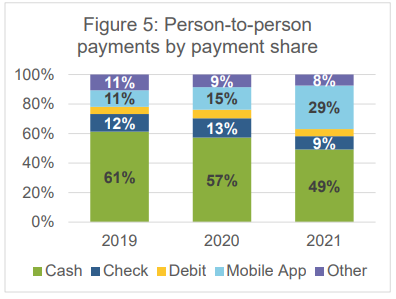
What’s more, the rate of mobile app payments increased drastically from 15% in 2020 to 29% in 2021 and likely higher ever since.
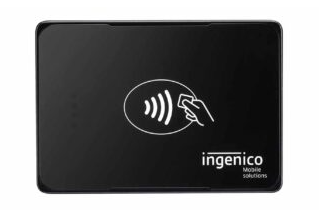
So you need an iPad POS provider that has mobile and contactless payment solutions like the Ingenico Moby 5500.
- Hardware Peripherals (Often Necessary):
- Stand/Enclosure: Securely holds the iPad on a counter, often allowing it to swivel and sometimes including integrated charging or card readers (e.g., Square Stand, Bouncepad enclosures). This adds professionalism and security.
- Receipt Printer: Usually a thermal printer connected via Bluetooth, Wi-Fi, or sometimes a wired connection (using adapters like those from Redpark) to print customer receipts.
- Cash Drawer: Securely holds cash and typically connects to the receipt printer, opening automatically when a cash sale is finalized in the POS app.
- Barcode Scanner (Optional): Connects via Bluetooth or USB (with adapter) to quickly scan product barcodes, speeding up checkout.
Your iPad point of sale system provider should have all the essential hardware ensemble. Ideally, you want the option to choose - A Square iPad stand, or a Red Heckler stand and drawer? A Belkin iPad ethernet adapter or a Redpark ethernet adapter?
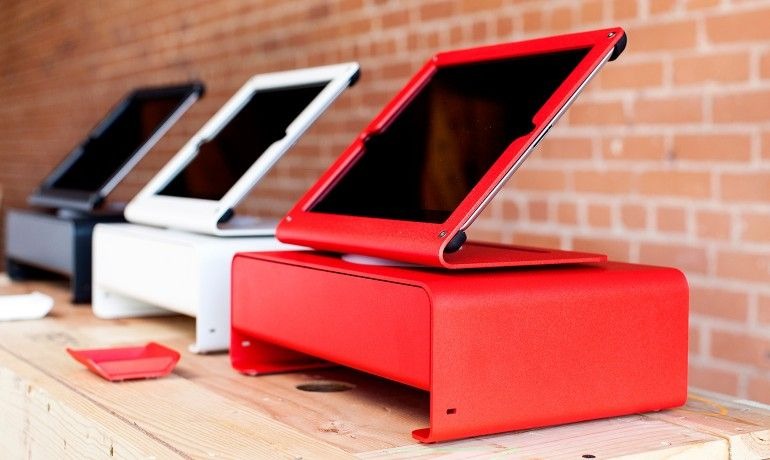
Red Heckler Stand & Drawer
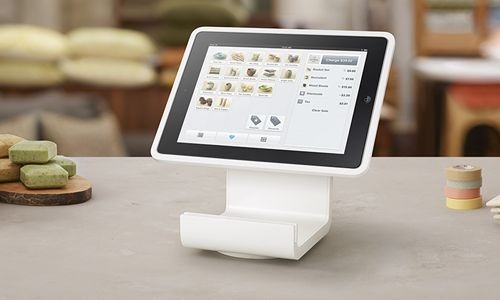
Square iPad Stand
You don’t just want proprietary gadgets (eg. Square iPad stand from Square), you want the option to choose from all available brands (and maybe even colors).
- Connectivity: Reliable internet (Wi-Fi or Cellular) is generally required for real-time processing, syncing data to the cloud, and software updates. Some apps offer offline modes for basic transaction processing if connectivity drops. Aireus for example, offers a Smart Offline Mode that automatically shifts to offline mode when internet or cloud connectivity drops.
In Smart Offline Mode, your system will:
- Allow orders to continue flowing to your printers.
- Allow you print receipts.
- Locally store your checks.
Once connectivity returns, everything gets uploaded to the cloud. And you don’t even have to do anything manually while all this is happening.
Wired connections for peripherals (using adapters like Redpark's) can enhance reliability over Bluetooth/Wi-Fi in busy environments.
Should You Use iPad Point of Sale Systems in 2025?
Using an iPad as a Point of Sale (POS) system is a popular, modern, and often cost-effective alternative to traditional cash registers and bulky POS terminals, especially for small to medium-sized businesses (SMBs), retail shops, restaurants, cafes, and service providers.
Below is a side-by-side comparison of traditional POS systems vs iPad point of sale systems, showing why the popularity is exploding:
Key POS Feature
Typical iPad POS System
Typical Traditional POS System
Mobility
Mobile and tableside service available
Terminals are usually fixed
Accessibility
Full access for remote management
Accessibility non-existent or heavily limited at best
Equipment Requirements
Little space required, easily replaceable parts
More maintenance and space required
Updates
Automatic system and software update
Updates are typically manual
Data storage
Cloud-based realtime storage
Local storage done manually
Training Requirements
Few days on average
Weeks on average
Real Time Analytics
Cloud based storage allows for real time AI analytics
Limited
Cost
As low as $1,000
As low as $5,000
FAQs
Question: Can I use my iPad as a POS system?
Answer: Absolutely! All you need to do is get an iPad point of sale software like Aireus and let the rest take care of itself.
Question: Does Apple offer a POS system?
Answer: Apple partners with AireusPOS to deliver best-in-class software for any of the Apple devices across their ecosystem.
Question: How do I set up my iPad POS?
Answer: Select a complete iPad point of sale software provider like Aireus, get the necessary hardware like printers and card readers, set up payment processors, and you’re good to go. If you hit any blocks during installation, the right software selection should have training and installation to assist you.